-
Install KS on external USB.
-
Boot KS USB from the PC.
-
Go to sysmaint, and insert an external hard drive to KS.
-
USBguard popup gonna show up and then in seconds the black screen login gonna show up, and if i type the username “sysmaint” then login in again, after couple of seconds i will be logged out again with the same issue. If i remove the external hard drive then everything will go back to normal.
1 Like
Uunable to duplicate this error - which version of KS are you using? Tested latest release and all good.
Also tested the “testers version” with no error.
1 Like
Yes testers enabled.
1 Like
Unable to reproduce on my end with a fresh Kicksecure 18 installation (both before and after installing updates).
- Installed Kicksecure 18.0.8.7 persistently to a USB drive (via Calamares, not just flashing the ISO).
- Booted from the persistent installation.
- Booted into user mode first to make sure /home/user existed since sometimes that’s important
- Rebooted into sysmaint mode
- Plugged in a Western Digital EasyStore external USB drive (12 TB). USBGuard notification appeared, sysmaint session did not crash. Drive shows up in
lsblk. - Unplugged and replugged the drive, same results as above.
- Installed all system updates, then rebooted, booting into sysmaint mode again.
- Plugged in the drive. USBGuard notification appeared, again the sysmaint session did not crash. Drive shows up in
lsblk.
2 Likes
18.1.3.4*
but i think you will land on the same error:
full journalctl (hope of there is a way to upload it here .txt).
Issue (i believe): Running unsigned software in EFI+Secureboot hardware, try to check this line:
localhost kernel: Loading of unsigned module is rejected
Around this the crashes happened (2 should be recorded) while im watching live journalctl by just clicking on restart sdwdate (yeah not even inserting another USB caused the black login screen).
Note: typing “sysmaint” in the black screen then Enter, will log you back in as a new login session.
2 Likes
Most likely relevant log lines:
ﻒﺑﺭ 06 03:11:50 localhost kernel: labwc[2244]: segfault at 5c4000000000 ip 000077a34b92080c sp 00007ffc62178df0 error 4 in libgallium-25.0.7-2.so[b2080c,77a34aee1000+173b000] likely on CPU 2 (core 8, socket 0)
ﻒﺑﺭ 06 03:11:50 localhost kernel: Code: 10 40 01 00 0f 8e c4 00 00 00 41 8b 45 00 48 8b 3c 24 be 01 00 00 00 4c 8d 05 83 22 d3 00 49 8b 55 08 45 8b 4d 00 48 8d 04 80 <4c> 8b 3c c7 49 8b 45 10 48 8b 3d 7d 3d db 01 49 8b 4f 28 48 89 c5
ﻒﺑﺭ 06 03:11:50 localhost kernel: audit: type=1701 audit(1770333110.029:920): auid=1001 uid=1001 gid=1001 ses=1 subj=unconfined pid=2244 comm="labwc" exe="/usr/bin/labwc" sig=11 res=1
ﻒﺑﺭ 06 03:11:50 localhost xdg-desktop-por[2658]: Error reading events from display: Broken pipe
ﻒﺑﺭ 06 03:11:50 localhost livecheck[2500]: The Wayland connection broke. Did the Wayland compositor die?
The compositor itself is crashing. libgallium is an internal component of Mesa, so something is crashing in the graphics rendering code.
@nurmagoz What graphics hardware is your system using?
2 Likes
Laptop is OMEN 16-ae0xxx, comes with Intel UHD Graphics and Nvidia RTX 4060.
1 Like
NVIDIA might be the culprit. I have a machine with an RTX 4070 that I can test on.
2 Likes
Just tested on my NVIDIA machine, was not able to reproduce the issue with either the Nouveau or proprietary NVIDIA 550 drivers.
If you can reproduce this in vanilla Debian 13, it would be best to report it there. If you can pinpoint a setting we’re using that’s causing the issue, that would also be useful to know.
1 Like
No sadly its not reproducible with debian.
Its a fresh installation no additional settings added/removed.
Will check if any additional useful logs can be added.
1 Like
Yeah nouveau is the issue (previous log):
localhost kernel: nouveau 0000:01:00.0: gsp: mmu fault queued
localhost kernel: nouveau 0000:01:00.0: gsp: rc engn:00000001 chid:16 type:31 scope:1 part:233
localhost kernel: nouveau 0000:01:00.0: fifo:c00000:0002:0010:[labwc[2244]] errored - disabling channel
localhost kernel: nouveau 0000:01:00.0: labwc[2244]: channel 16 killed!
New recorded screenshot (then the crash will happen after):
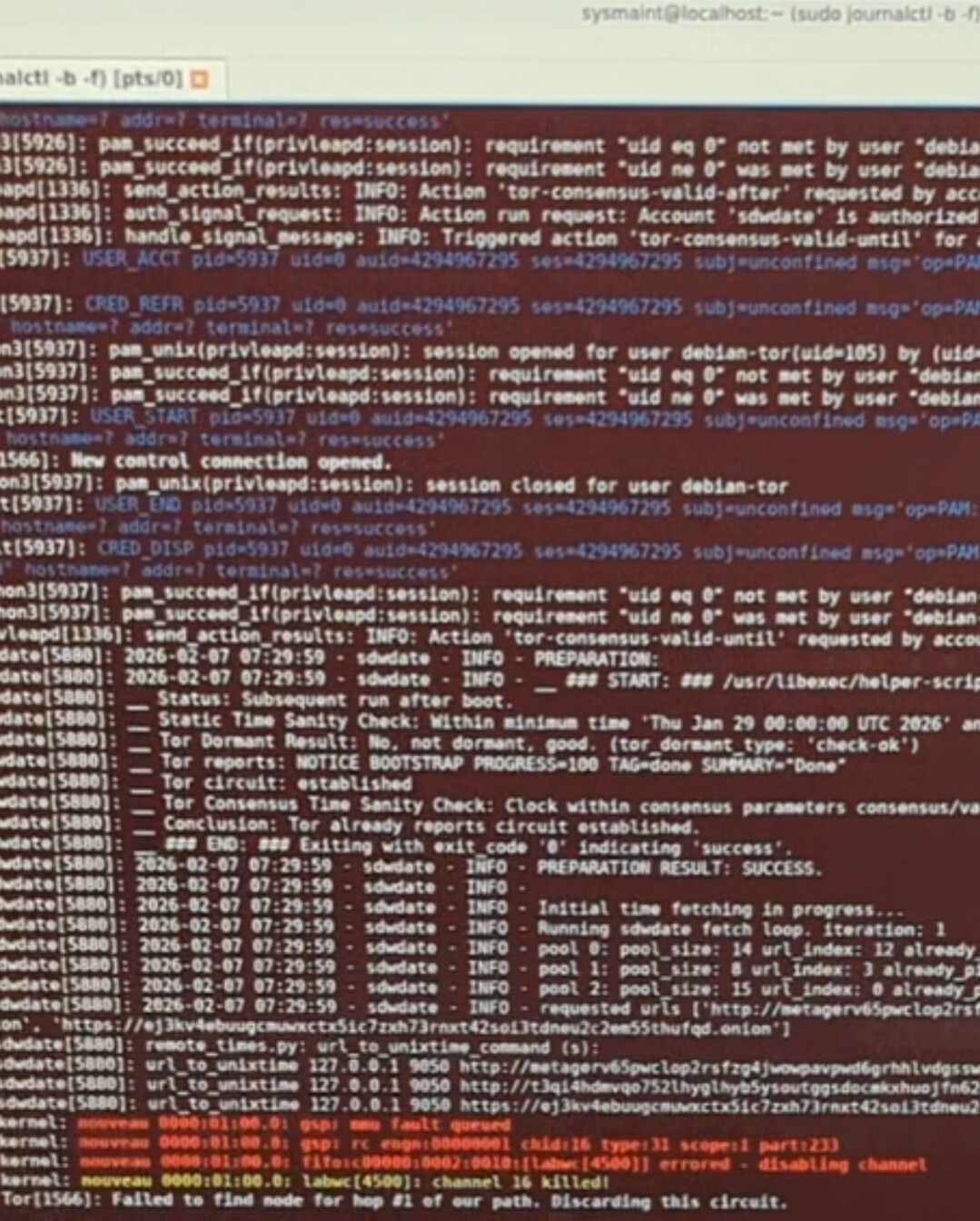
So the OS is sorta unusable when this issue occur, because machine will logout at any moment with no stop.
So might be disable interaction with nvidia hardware by default and we can put it as an option in the calamares installation list and/or in System Maintenance Panel? (also adding the option of either using open source nvidia or the proprietary one).
1 Like
Found the workaround (nvidia proprietary):
sudo apt install nvidia-driver nvidia-kernel-dkms
or
sudo apt install --no-install-recommends firmware-nvidia-gsp nvidia-smi nvidia-driver nvidia-kernel-dkms
It will ask you that it will conflict with nouveau but reboot gonna fix it, fine reboot after installation finish (gonna take time when building nvidia).
Enroll Secure Boot MOK then do the necessary steps:
Done, no crushes and run:
sudo nvidia-smi
to make sure that nvidia has been detected.
3 Likes
That may make life difficult for users who have NVIDIA as their only graphics output (high-end desktop CPUs may come with no integrated graphics, some older laptops may also be like that). Nouveau is also not unstable for all users (it’s pretty stable on my hardware, or so it seems initially). Is there a generic graphics driver that can be used with success, like a VESA driver? If there is, maybe it would work to default to that driver and software rendering, then expose options in the system maintenance panel for switching to accelerated graphics with either open-source or proprietary drivers.
1 Like
Very specified cases, i dont know any market which sell a pc or laptop without CPU integrated graphics (i think even impossible).
Its a plus if KS doesnt work on old hardware, but sadly i have x200 where KS is working fine on it (no nvidia card).
User who want nvidia/amd graphic cards he can enable that from the panel options, and/or enable/install related drivers manually (in calamares installer list might be the best option).
Otherwise we should have a list of where KS is working properly VS not (similar to Qubes hcl). or worst case scenario we ship nvidia proprietary by default.
Note: This also effect KS/WS on KVM because VMs can be mapped to the nvidia graphic card which will activate nouveau, VirtualBox is not effected because Vbox cant be used with nvidia.
calamares must be kept simple. We cannot add thousands of options there (various requests for various calamares configurable settings exist) because testing these is time consuming (requires installation using calamares).
1 Like
I’s quite common unfortunately. See:
AMD also has processors without integrated graphics, I believe the Ryzen 8000 F-series is an example, as well as older non-G-series processors.
I disagree but that’s a side-topic.
AMD’s “full fat” graphics drivers are built into the kernel already, so disabling them would make little sense and would be difficult (similar to disabling Intel’s graphics drivers). Those drivers are also used for AMD’s iGPUs so they’re needed in any event.
We need some way for NVIDIA users to get graphics output though even if we disable Nouveau by default, since like discussed above integrated graphics are oftentimes just not there.
1 Like
Look at distros which are using calamares, they are adding thousands of options for the installation. But yeah testing them is essential for stability.
Good list, never saw one in the local nor in the online PC with one of these CPUs.
I gave all the possibilities in my previous post, maybe make a wiki page of hardware that has issues with KS.
A future version of systemcheck that will probably be released with Kicksecure version 18.1.3.9 and above will have improved Journal Inspection and Diagnostics Logs, therefore making this issue if appearing on any system easier to detect and link to wiki/nvidia (yet to be written) where workarounds will be documented.
3 Likes