Install medium: Sandisk USB (Baremetal no virtualization)
Partition format: ext4 (auto-formatted) + LUKS
Bios: Coreboot
I’m a big fan of the clean desktop background, nice and simple! That said, I think the default layout could feel even tidier if we removed a few of the pre‑installed shortcuts: the Computer, Trash, and Home (user) folder shortcuts to be exact.
Leaving the Home folder icon in place is fine, but dropping it would give the desktop an even sleeker look, at least in my opinion. Just a bit of feedback from my side.
Oh and one more thing, I’m not sure whether it’s possible to unintentionally drag the Home folder shortcut into a browser window. Imagine an user accidentally dropping it onto an upload field, suddenly they’re trying to upload their entire home directory. Would that scenario even be possible?
I’d prefer to not mess with the desktop too much unless there’s a practical reason to do so. Some people would prefer an iconless desktop, some others might prefer a desktop with desktop shortcuts for accessing the home folder, etc. If we do make an aesthetic change, it should probably be in response to poll feedback so that we know that we’re making a change that is generally beneficial to our userbase.
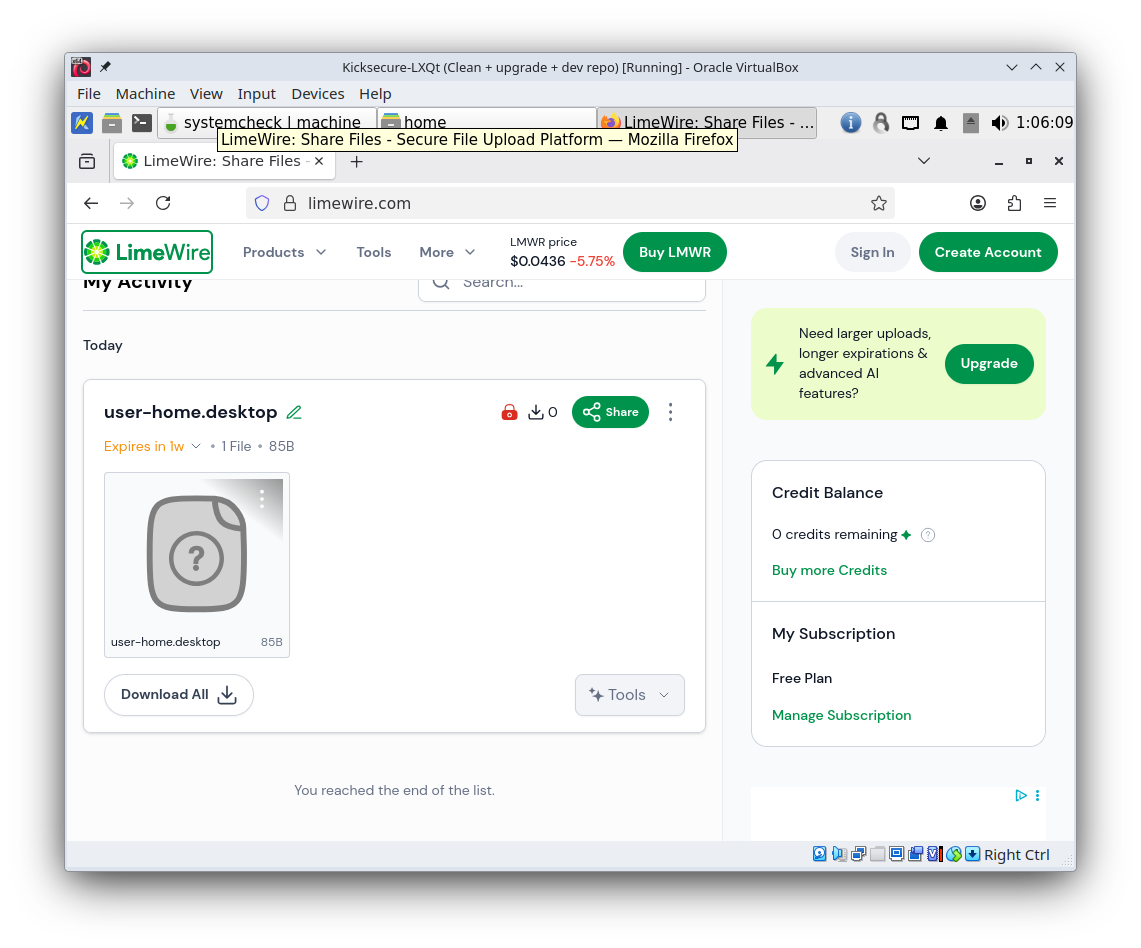
Tested it in a VM just now. It looks like this is not possible; if I drag-n-drop the “user” desktop shortcut into a file sharing website, it ends up uploading a single small file named user-home.desktop, not my entire home folder. Screenshot:
(Note, I have no idea how trustworthy “Limewire” is, I found them in Google search results. This was done in a VM with no sensitive information and no shared folders. I just used them as an example since they were convenient and didn’t require me to sign up for anything to test this.)