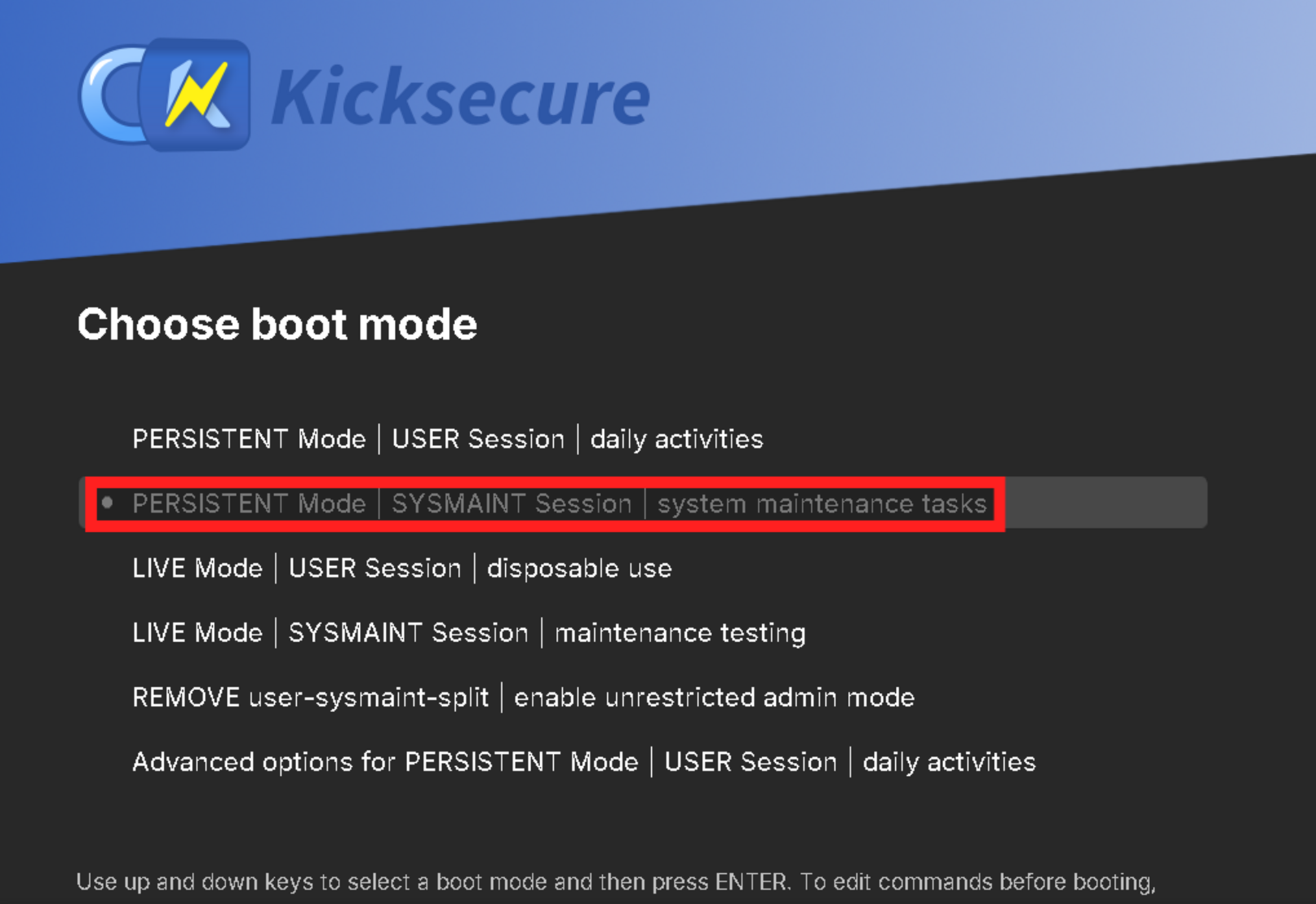
Hi, I am new to Kicksecure. I was looking for a Tails alternative, to use with the same “amnesic” concept, in Live mode. From what I’ve read, Kicksecure also wipes ram at the end.
The thing is, I don’t really need Tor for everything, and it appears it’s annoying trying to install a VPN with Tails.
What I want to do is this:
Download Tor Browser
Using Tor Browser, download Mullvad VPN software
Install Veracrypt
Could someone explain the workflow for this? Is it the same as regular Debian? I was able to install Tor Browser in Debian, but I never installed Mullvad VPN. I did also install Veracrypt successfully. Ideally, Kicksecure should come with Veracrypt preinstalled, so I don’t need to install it everytime I boot Live to use it.
Let me know any tips and things to do when you boot if there’s anything worth changing that comes by default set in a certain way. Thanks.
Answering slightly out of order since some of your later choices impact earlier ones:
Veracrypt cannot function with user-sysmaint-split installed. You will need to boot the system using the REMOVE user-sysmaint-split boot option once and follow the on-screen instructions. This will remove the feature and allow Veracrypt to work.
Can be done using browser-choice within PERSISTENT Mode | USER Session. The browser will be available in live sessions thereafter.
Same process as for Debian applies. Usually you would need to boot into PERSISTENT Mode | SYSMAINT Session to install software, but after removing user-sysmaint-split this will no longer be the case.
Not possible due to licensing difficulties and absence from Debian’s repositories. See:
Also incompatible with the user-sysmaint-split security feature. See:
Not sure what you meant “boot once”, since it’s a live session. Im assuming you just mean that i just boot with that option that shows in the menu here:
And then I just install Veracrypt normally.
So how do people manage encrypted data with that option enabled? Veracrypt sees like the best way I’ve tried.
So after I install Mullvad software, I can run Firefox and it will be under Mullvad selected IP?
Also, I’ve read here that if you install Mullvad Browser it automatically installs Mullvad VPN, do you recommend Mullvad Browser over regular Firefox? Never tried it.
The option to boot with is a few entries below the one highlighted. When you boot it, you will be prompted if you really want to remove user-sysmaint-split. After confirmation, the system will automatically reboot and the “SYSMAINT Session” boot modes will be gone. I mentioned “once” to make it clear that you would not need to boot into this boot mode every time.
After that procedure is done, you can install Veracrypt normally from PERSISTENT Mode | USER Session.
Full disk encryption with LUKS is the most common option and is fully supported. For files that have to be moved around, they can be archived with LXQt Archiver and encrypted using OpenPGP. (KGpg, a recommended application that is not preinstalled on Kicksecure, can be used to do this. Click File > Open Editor in KGpg to get to the part of the UI allowing file encryption and decryption.)
I’m not aware of a good volume-based encryption app that works with Kicksecure out of the box. There is some work being done to find one, and a possibility that we could create one in the future. See:
I don’t use Mullvad VPN, so I don’t know. Can likely be confirmed by experimentation, or you could ask Mullvad’s support. (The only reason I know that the installation process should be the same as on Debian is because Kicksecure is based on Debian and anything possible on Debian should be possible on Kicksecure.)
I don’t know if Mullvad VPN comes with Mullvad Browser. I remember saying something to that effect once but IIRC that was a misunderstanding and I was corrected on that. It might come with it, it might not.
Kicksecure doesn’t recommend any particular default browser, since they all have flaws that prevent them from being a default choice. This is why browser-choice is provided, so users can pick whatever option they deem least bad from a pool of common, fully open-source browsers. Personally, I use Google Chrome since my threat model is able to tolerate its privacy intrusions and open-core nature, but I would never recommend it to anyone who’s trying to stay anonymous for obvious reasons.
What I found confusing is, how does it save you selected this setting on a new boot given that you are using a read-only live USB/DVD?
How does it work in a persistent way if it’s a live USB/DVD? I still don’t get this part.
Tails comes with their own Veracrypt version, probably to be able to ship it with it and get around something that wouldn’t allow for it. Perhaps you could use Veracrypt as a base. It has great features and it’s an established software. As far as LUKS, I already use it for FDE for the regular Debian installs. In this case im looking for an amnesic setup were nothing is saved, this is why im not sure how any persistent thing and reboots that save settings work within this context. But anyway, im going to try that mode and see what happens.
given that you are using a read-only live USB/DVD?
That isn’t the intended way to use Kicksecure from a portable drive for daily use. The documented way to make a portable Kicksecure installation is to boot the system from the live ISO, then insert a second USB key and install the OS to that USB key like you would install to an internal drive. You can then boot in persistent mode when you need to make changes (i.e. install software updates, which are critical for security and must not be skipped), and you can boot in live mode when you need the system to be amnesic. See:
It is technically possible to use Kicksecure directly from a live ISO, but then:
You’ll need to reinstall all your software on every boot
Removing user-sysmaint-split is not an option
You won’t get some (or depending on how you use it, any) software updates, leaving your system insecure
You won’t get any theoretical increase in security if using a USB key as the underlying storage media is writable and ISO filesystems can be written to with some difficulty
In other words, you get a lot of downsides (including security holes) for no good reason other than to make one specific attack harder (not impossible, just harder). You can work around these issues by building your own ISOs periodically with derivative-maker, but this is non-trivial and for expert users only. It’s much easier and safer to do a persistent installation and keep it up-to-date. If you don’t do any of your work when in persistent mode, you likely won’t run into issues.
From a quick look, it looks like it’s a read-only thing, which I guess is what you’re looking for. Do the archives you work with have to be in VeraCrypt format? If you can swap to PGP-encrypted .tar.gz archives, you can decrypt and unzip them in live mode and have their contents vanish on reboot.
Not sure if I want persistent anything going on at any point in time. Example, you open some text files were temporary files are saved somewhere, you open a bitcoin wallet and some debug/log file is kept somewhere showcasing for instance, wallet filenames, you do anything else that may reveal valuable information in some form. There could also be some bug that writes data in the wrong moment. If you use it in read-only mode at all times, there is no way this happens. I simply do not want persistence at all, at any point. If I cannot use veracrypt in this state (im still not sure why?) then I guess I cannot use this OS. Reason im interested in Veracrypt is, well I have been using it since Truecrypt days and I don’t feel like moving my documents to a new format, or having to learn something else and screw up in the process. The documents I move are rather small, I don’t need some huge 100GB container, it’s mostly documents basicaly.
Tails works like this, and they roll out updates just fine, I doubt it’s an huge issue, compared to not being aware that you saved the wrong data somewhere that leaks information, so I would rather stay 100% Live.
It’s kind of unavoidable even if you use an ISO / live image, unless you burn it to a DVD. If the underlying media is writable, malware that gains enough access will be able to write to it even if the filesystem supposedly forbids that. If your use case really requires a totally read-only baremetal environment, then you will need to learn how to use derivative-maker (and cope with its occasional bugs as it is mostly a developer-internal tool and sometimes ends up in a state where it works for us and breaks for others).
The way in which grub-live mode is implemented tries to avoid all of this as much as possible. The files on disk end up acting as a backing store for an ephemeral environment. In-RAM filesystems are overlayed over the top of everything that reasonably can be overlayed, and an indicator in the system tray warns you if something has been left non-overlayed that you likely care about. If you’re interested in the source code, see:
A malicious process with root rights could still write to the disk by mounting the read-only root filesystem read-write, but that’s a risk even when using a live ISO.
Come to think of it, the ISO has an “unrestricted admin mode” boot entry. If you use that, you will get a normal desktop where you can use sudo and install VeraCrypt. You’ll still have the headache of having to reinstall everything on every boot, and you still won’t get security updates until a new ISO comes out or you build your own, but that will let you get around the issues with user-sysmaint-split. (user-sysmaint-split causes issues with VeraCrypt because VeraCrypt needs root access to operate, and user-sysmaint-split prevents applications from getting root access even if they have your password if you are booted into a standard desktop.)
That’s because Tails works in a fundamentally different way from Kicksecure when it comes to how updates are rolled out. Updates are provided in the form of new OS images which you flash, and new images are rolled out frequently. Kicksecure on the other hand provides updates in the form of apt packages (some from Debian, some from ourselves) which are installed using standard package management tools. New ISOs are released infrequently, meaning the latest available ISO may be rather out of date and in need of updating before it is safe.
Depends on your threat model. If you are only viewing trusted files, working with trusted data, visiting trusted websites, and are only connecting to the Internet through a trusted network (no malicious devices on the LAN), then you’re likely fine. But if any of those don’t hold true, and there’s a vulnerability in some of the software on an old Kicksecure ISO, malware could theoretically infect the live system and steal your data regardless of whether it’s written to the disk. That isn’t much better than having it stick around on disk.
Alright, lots to unpack here, but I saw this thread and figured I’d chime in with some details that might help as I see some unmentioned info that may be useful. Please do one topic per thread going forward
First things first Kicksecure isn’t Tails, but it does have a grub-live boot option that’s pretty close. That session runs entirely in RAM, just like Tails. One heads up though. If you mount any external drives, traces can still get left behind, so be careful there. Same risk applies to both Kicksecure and Tails in that regard.
As of right now, the only way to get a “Tails like” setup with Kicksecure is to first burn a bootable media (looks like you did that). You’ll then need a second USB or external SSD, then install it the same way you’d install Debian with the GUI installer onto an internal drive. Just point it at the other USB or external drive instead. Worth noting to my knowledge, Dracut doesn’t support a persistence.conf, as discussed here:
Anyhow after installation, you’d want to make grub-live the default boot option, then lock down the bootloader with a grub password.
When you install software on Tails, you need an admin password for that session, conceptually similar to Kicksecure’s sysmaint mode, though Kicksecure is definitely more locked down and restrictive. On Tails, apps get saved to a persistent partition that’s not in RAM, while the rest of the system is RAM-mounted. With Kicksecure, you install apps via sysmaint (basically like a Tails admin session) whenever you need to save settings or software, then switch back to Live Mode for normal use. If you install onto a USB with LUKS encryption, you get an extra layer of protection on top.
Maybe full support for it will come down the road. More distros are moving toward Dracut anyway (Fedora already uses it). For what it’s worth, Tails itself uses this approach (persistence.conf), and Kali’s docs actually recommend it for setting up custom live USBs, which is pretty close to what you’re trying to do with Kicksecure. But again I haven’t found anything latest on any mailing list about it. Just thought I would mention it so you understand its not available yet but may change in the future.
Use tb-updater for that. You dont need sysmaint mode but you need to boot into a user non live mode to download it and set it up first.
You can either use browser-choice to install Mullvad Browser, which will add the Mullvad Debian repo so you can run sudo apt install mullvad-vpn, or manually add the repo following the instructions on Mullvad’s site.
Can’t help you with that one, unfortunately. Hoepfully Kicksecure will have some kind of wrapper, fix, or at the verry least a way to use LUKS in user mode in the future without removing the protections of sysmaint.
If that works, boot into sysmaint and append it to the grub-live entry. Then when you boot from your Kicksecure USB (ideally with no internal drive connected, if you want to be absolutely sure), establish a WiFi or wired connection first, then yank out the USB. At that point you’re fully in RAM with no media left to write anything to.
Again if it works it depends on how much RAM you have and what you’re running (RAM exhaustive apps), you should be fine for most tasks. But if you’re dealing with transferring files larger than your total RAM? Yeah, that’s not happening, it’ll just crash.