Right now, idle power management is planned to be disabled under virtual machines, both Qubes and non-Qubes, in Kicksecure 18. However, it’s unclear how we want to handle power management on physical hardware.
First off, a lot of the power management features of LXQt include the ability to suspend or hibernate the machine. Hibernation obviously has security risks because RAM contents are dumped to the disk, but hibernation likely doesn’t work out of the box on Kicksecure anyway, and LUKS can mitigate most of the concerns. What is more concerning is suspend, because LXQt unfortunately puts the system into suspend before locking the screen. This means if one wakes the system, they will be shown a flash of the user’s desktop before the screen locks. It’s extremely brief, but it’s more than long enough to capture a snapshot of the user’s screen with a camera (and depending on the speed of the system it might be enough to deploy a malware payload via a rubber ducky or similar before the screen locks).
LXQt has a lot of power management features; going through each of them:
- Battery watcher. Allows the user to lock their screen, suspend, hibernate, shutdown, turn off external monitors, and/or receive a notification when the system’s power gets too low. Can warn users for some period of time before taking a power management action in response to a low battery. Also shows a battery level icon.
- Security concerns:
- Battery level icon: Very little concerns. An attacker who gets access to an encrypted but unlocked system might use the charge level to decide whether or not they want to keep the system powered on while moving it to a more convenient attack location, or if they want to attempt an attack right where they’re at, but in all likelihood hiding this info likely won’t defend against most realistic attack scenarios.
- Battery low notifications: Same concerns as for battery level, this is probably even less worrisome.
- Warning (timeout before taking power management action): Same concerns as battery low notifications.
- Low power actions:
- Ask: Security impact identical to battery low notifications.
- Lock screen: Minor positive security impact, though most users would be better served by automatically locking the screen after some duration of idle time.
- Suspend: Minor negative security impact (could be problematic if the battery reaches a low power level before the screen locks due to idleness, due to screen locking prevention discussed above).
- Hibernate: Security impact dependent upon setup. Usually not a concern because it doesn’t work out of the box.
- Shutdown: Minor positive security impact, though again this would be better handled by an idle timeout.
- Turn Off monitor(s): Very minor positive security impact. Attacker would need to be trying to physically observe user’s screen from some distance for this to matter.
- Usability concerns:
- Battery level icon: Very useful for laptop users. Mobile users could run out of power mid-work without this.
- Battery low notifications: Useful for the same reason as the battery level icon.
- Warning (timeout before taking power management action): Positive usability impact. Mitigates issues introduced by automatic power management actions.
- Low power actions:
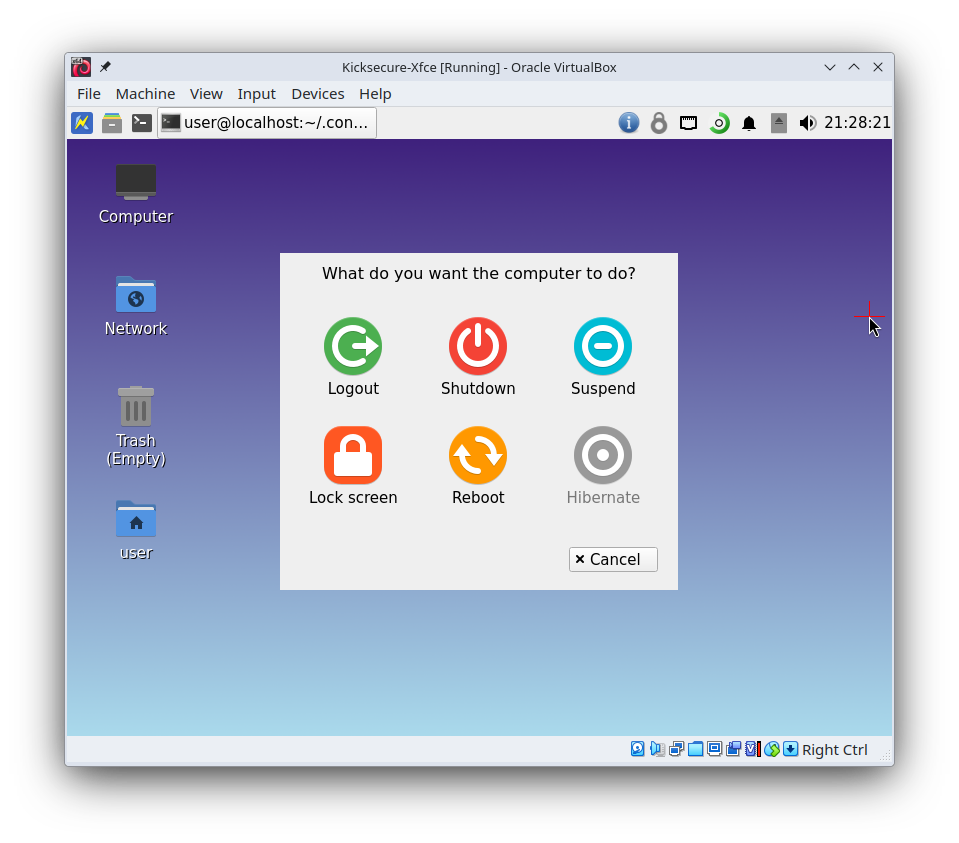
- Ask: Annoying because it suddenly creates a popup window like so: Possibly dangerous, users could lose work if they tried to click inside a window right where the shutdown, reboot, or logout button appeared just as the window popped up. The power management warning is only a partial mitigation for this.
- Lock screen: Rather useless for preserving battery life, mildly annoying even with the warning timer.
- Suspend: Mildly annoying, but may prevent loss of work by preserving battery power. The warning timeout mitigates this. Overall, positive usability impact.
- Hibernate: Same usability impact as suspend, except it takes longer to enter and exit hibernate. Overall, possibly positive usability impact.
- Shutdown: Very annoying and dangerous, user will lose all unsaved work when the power level gets too low unless they are able to immediately plug in a source of power when the warning notification appears. Not sufficiently mitigated by the warning timeout, unless the timeout is made very long.
- Turn Off monitor(s): Possibly somewhat useful for avoiding data loss since powering off monitors may improve battery life, but this isn’t that useful. Mildly annoying. Attempts to use xset to power off monitors, thus it doesn’t even work under Wayland.
- Security concerns:
- Lid watcher. Controls what happens when the user closes the lid of the system. Can lock the screen, suspend, hibernate, shutdown, or turn off monitors when the lid is closed. Supports separate settings for when on battery and when on AC power, and also support separate settings for when an external monitor isn’t attached and when it is.
- Security concerns:
- No difference in security concerns between the different customization possibilities (on battery / on AC / with external monitor connected / without external monitor connected) except in as much as each option applies to individual user threat models. For instance, a user might only plug their system in while at a location safe from physical attackers, thus their threat model would permit more convenient settings while plugged in and require more safe settings while unplugged.
- Lid close actions:
- Lock screen: Positive security impact. User can close lid to render whatever they were actively working on inaccessible to a physically present attacker, barring a screen lock bypass or vulnerability in another component of their installation.
- Suspend: Negative security impact. Closing the lid will indefinitely prevent the screen lock and allow a physically present attacker to capture a screenshot of their work as explained above.
- Hibernate: Security impact dependent upon setup. If user has unencrypted swap, this is virtually fatal when defending against a physically present attacker, as they can capture not only everything that was on the screen, but the full memory contents of everything on the system. If swap is encrypted and requires a passphrase to unlock, this probably won’t suffer from the indefinite screen lock pause issue because a password will be required to resume. If swap is encrypted but a TPM can unlock it, then this suffers from the same issues as suspend. (Note to readers: This is all theoretical, Kicksecure lacks features that would be needed to do things like unlocking an encrypted hibernation volume with a passphrase or TPM with a vanilla Kicksecure configuration.)
- Shutdown: Positive security impact. User can close lid to render everything they were doing inaccessible to a physically present attacker, even if their system contains vulnerable components. However, shutdown may be slow, giving an attacker a window of opportunity to extract useful data before the system shuts down (most attackers probably will not be able to act fast enough for this to be of any use to them). Would be better if there was a way to trigger emerg-shutdown when the lid was closed.
- Turn Off monitor(s): Extremely minor positive security impact, maybe, but so negligible as to call it nonexistent unless dealing with an attacker in possession of technology that can reconstruct screen contents based on the light coming from the screen’s reflection off the laptop chassis. Even then, some laptops turn off their screen in hardware when the lid is closed. Might have more of a positive impact if external monitors can be turned off also.
- Usability concerns:
- The different customization possibilities have different usability concerns based on the action in question.
- Lid close actions:
- Lock screen: Positive usability impact. Most users used to WIndows will expect that closing the lid will result in the screen being locked. (They would also expect the system to suspend, but at least this fulfills some of the expectation.)
- Suspend: Debatable usability impact. On one hand, most users used to Windows will expect taht closing the lid will result in the system going into suspend. On the other hand, suspend may interrupt actions such as software updates, downloads, long running processes, etc., and thus be undesirable for some users.
- Hibernate: Debatable but probably negative usability impact. User has to wait for RAM contents to be reloaded from swap upon resume, and may need to authenticate before the system fully resumes.
- Shutdown: Dangerous, negative usability impact. User will lose all unsaved work if they or someone else (usually a pet) closes the lid unintentionally.
- Turn Off monitor(s): Minor positive usability impact due to power savings.
- Security concerns:
- Idleness Watcher: Controls what happens when the system has been idle for some duration of time. Has the same set of power management actions as the lid watcher. Supports separate settings for when on battery and when on AC, and allows configuring the time before the system is considered idle. Can disable idleness checks when a fullscreen app is in use. Also offers backlight change settings, but these will almost certainly not work for users with user-sysmaint-split installed.
- Security concerns:
- Idleness actions:
- Lock screen: Positive security impact. Users who forget to lock their screen before walking away from their machine will be protected from a physically present attacker, if that attacker doesn’t manage to see the screen contents of the user’s system before the lock screen activates.
- Suspend: Negative security impact due to the locking issue described at the top of the post.
- Hibernate: Security impact dependent upon setup. Identical concerns as for the hibernate lid close action.
- Shutdown: Positive security impact for the same reasons as the lock screen idleness action. Protections against exploits are stronger.
- Turn Off monitor(s): Minor positive security impact. Attacker would need to be trying to physically observe user’s screen from some distance for this to matter.
- Brightness controls: Same security impact as the “Turn Off monitor(s)” idleness action, but likely less effective than truly turning off the monitor.
- Idleness actions:
- Usability concerns:
- Idleness actions:
- Lock screen: Positive usability impact. Users used to Windows will not expect their system to be accessible to an adversary who shows up and looks at the system after some amount of time has passed.
- Suspend: Debatable usability impact. May improve battery life, but can also interrupt long-running processes, see usability concerns for suspend lid close action.
- Hibernate: Debatable but probably negative usability impact, see usability concerns for hibernate lid close action.
- Shutdown: Dangerous, negative usability impact. User will lose all unsaved work if they have to step away from the system for longer than the configured idle time.
- Turn Off monitor(s): Minor positive usability impact due to power savings.
- Brightness controls: Positive usability impact due to power savings, but usually this won’t work as mentioned above.
- Idleness actions:
- Security concerns:
- Power keys: Allows configuring what to do when the user presses a power, suspend, or hibernate key. These options do nothing under Wayland, power keys are configured by the compositor instead, thus skipping this section.
Personally, I’d recommend the following settings for physical hardware installations based on the above analysis:
- Battery Watcher:
- Low power action: Nothing
- Warning timeout: 30 seconds
- Level is low at: 10%
- Show icon: Yes
- Icon for the icon: Whatever the default is
- Lid Watcher:
- When lid is closed on battery: Lock screen
- When lid is closed on AC power: Lock screen
- Disable the extra settings for when using external monitors
- Idleness watcher:
- When idle on AC: Lock screen
- AC idle time: Unsure. For paranoid setups, a very short time might be preferable (30 seconds is the shortest supported timeout), but IMO people should not be relying on the idle timeout for security anyway because it is by nature unreliable. Thus we can probably favor usability here since security is better obtained by other means. Maybe just accept the default of 15 minutes?
- When idle on battery: Lock screen
- Battery idle time: Unsure, maybe just accept the default of 15 minutes?
- Disable backlight change
- Do not disable idleness checks when fullscreen