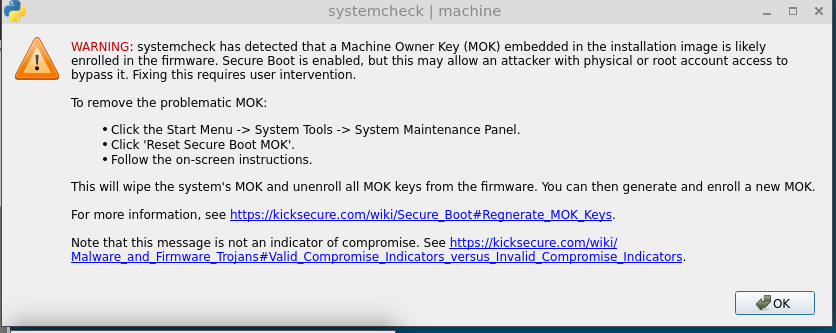
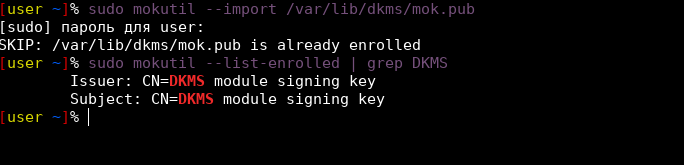
I did everything according to the instructions, clicked reset secure boot mok, then I rebooted the computer and clicked enroll secure boot mok. then I checked the sudo mokutil --list-enrolled | grep DKMS received the message Subject: CN=DKMS module signing key After adding the key, I still get the message I did everything according to the instructions, clicked reset secure boot mok, then I rebooted the computer and clicked enroll secure boot mok. then I checked the sudo mokutil --list-enrolled | grep DKMS received the message Subject: CN=DKMS module signing key After adding the key, I still get the message
% sudo journalctl -b --no-pager -u systemd-modules-load.service
[sudo] пароль для user:
Feb 01 09:59:41 localhost systemd-modules-load[384]: Module ‘jitterentropy_rng’ is built in
Feb 01 09:59:42 localhost systemd-modules-load[384]: Failed to insert module ‘tirdad’: Key was rejected by service
Feb 01 09:59:42 localhost systemd-modules-load[384]: Inserted module ‘msr’
Feb 01 09:59:42 localhost systemd[1]: systemd-modules-load.service: Main process exited, code=exited, status=1/FAILURE
Feb 01 09:59:42 localhost systemd[1]: systemd-modules-load.service: Failed with result ‘exit-code’.
Feb 01 09:59:42 localhost systemd[1]: Failed to start systemd-modules-load.service - Load Kernel Modules.
Feb 01 09:59:56 localhost systemd-modules-load[1145]: Module ‘jitterentropy_rng’ is built in
Feb 01 09:59:56 localhost systemd-modules-load[1145]: Inserted module ‘tirdad’
Feb 01 09:59:56 localhost systemd[1]: Finished systemd-modules-load.service - Load Kernel Modules.
[user ~]%
In a sysmaint session, could you run sudo /usr/sbin/rebuild-dkms-modules and share the output here? This looks like the DKMS modules didn’t get rebuild after the new key was enrolled.
Feb 01 09:59:41 localhost systemd-modules-load[384]: Module ‘jitterentropy_rng’ is built in
Feb 01 09:59:42 localhost systemd-modules-load[384]: Failed to insert module ‘tirdad’: Key was rejected by service
Feb 01 09:59:42 localhost systemd-modules-load[384]: Inserted module ‘msr’
Feb 01 09:59:42 localhost systemd[1]: systemd-modules-load.service: Main process exited, code=exited, status=1/FAILURE
Feb 01 09:59:42 localhost systemd[1]: systemd-modules-load.service: Failed with result ‘exit-code’.
Feb 01 09:59:42 localhost systemd[1]: Failed to start systemd-modules-load.service - Load Kernel Modules.
Feb 01 09:59:56 localhost systemd-modules-load[1145]: Module ‘jitterentropy_rng’ is built in
Feb 01 09:59:56 localhost systemd-modules-load[1145]: Inserted module ‘tirdad’
Feb 01 09:59:56 localhost systemd[1]: Finished systemd-modules-load.service - Load Kernel Modules.
Building module(s)… done.
Signing module /var/lib/dkms/tirdad/0.1/build/module/tirdad.ko
Module tirdad/0.1 for kernel 6.12.57+deb13-amd64 (x86_64):
Before uninstall, this module version was ACTIVE on this kernel.
Deleting /lib/modules/6.12.57+deb13-amd64/updates/dkms/tirdad.ko.xz
Running depmod… done.
Building module(s)… done.
Signing module /var/lib/dkms/tirdad/0.1/build/module/tirdad.ko
Module tirdad/0.1 for kernel 6.12.63+deb13-amd64 (x86_64):
Before uninstall, this module version was ACTIVE on this kernel.
Deleting /lib/modules/6.12.63+deb13-amd64/updates/dkms/tirdad.ko.xz
Running depmod… done.
I guess this means either the documentation or the code has a bug when it comes to rebuilding DKMS modules after making a new key. Will investigate further
Can you try running sudo dracut --force and see if that fixes it? Maybe kernel modules are being embedded into the initramfs and failing to load, but then successfully loading once the system fully boots. If so, that command should fix the issue.