Getting Kicksecure to install with BTRFS is pretty easy, almost trivial. Getting a snapshotting UI is a bit harder since btrfs-assistant (the only good Snapper frontend I know of) isn’t available in releases older than Trixie. There’s other ways of managing BTRFS snapshots that are worth looking into though, so I don’t see why we can’t make BTRFS an option for now and then explore further developments with it later.
Which will as I assume into asking the user if btrfs or ext4.
defaultFileSystemType: "ext4"
Let’s just change the default and avoid adding an extra question? Advanced users are free to use the partition too but I think for most users this is a too confusing, difficult question to decide.
Do we currently have “double swap” issue? swap-file-creator + swap sub volume created by calamares?
Let’s just change the default and avoid adding an extra question?
BTRFS comes with significant additional maintenance needs and benefits from the user having some level of technical expertise. I would be leery of using it as the default. Lubuntu, Kubuntu, and Ubuntu Unity have been shipping with a multi-choice between ext4, BTRFS, and xfs for a while now and no one has reported problems figuring it out (presumably because they stick with the default of ext4 if in doubt). Those who know what they’re doing can change it manually, was my thinking.
BTRFS as used by Calamares BTRFS layout breaks grub-live (actually, dracutrootovl module). Therefore, Kicksecure 17.2.8.2 (hotfix release) and above will have BTRFS removed from Calamares until this issue can be resolved.
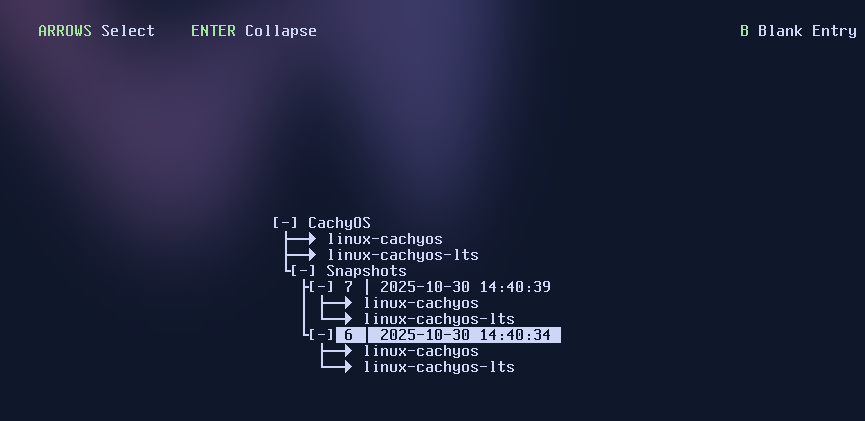
When any package installed (change happened) there should be on the boot menu new snapshot created with time and date, not in kicksecure-btrfs boot menu.
[…] my only remaining concern is with BTRFS. Systems that use ext4 can easily recover if disk space is exhausted. Systems with BTRFS cannot always recover at all when disk space is exhausted, as the filesystem sometimes must allocate additional space even to delete files or other intuitively space-freeing activities, meaning that once the disk fills up, it can be impossible to free up space without using dangerous and difficult techniques. Therefore a DoS against a system using BTRFS disks could be much more damaging than a DoS against a system using ext4 disks, […]
BTRFS’s behavior can be somewhat deceptive in this regard.
BTRFS allocates data in large chunks (usually 1 GB for large devices), and marks them as either “data” or “metadata” blocks. A few large files will consume mostly data, so if you do cat /dev/random > testfile like illustrated above, the filesystem will run out of space in data blocks and run out of unallocated space, but will still have a significant amount of space left in metadata blocks.
Deleting a file actually requires free metadata space to be available. So does “balancing” the disk to consolidate data blocks together to free up unallocated space. In this simple case, because there is free metadata space, you can easily delete the test file, and have space again.
Where things go wrong is when you have a filesystem in production use, where you have many small files consuming metadata, and the disk is nearly full. Eventually all unallocated space will be used up, but the filesystem will still function because of free space left in the data and metadata blocks. If you run out of space in data blocks, you can still delete files, but if you run out of space in metadata blocks, then you can have a very hard time recovering. There’s no free metadata space, so you can’t delete files to free up unallocated space or reduce the size of metadata. You also can’t consolidate free space in data blocks in order to free up more unallocated space, because balancing the disk requires free metadata. The filesystem effectively becomes permanently read-only.
There are ways to get around the issue, such as temporarily adding a second drive to the filesystem so that there’s unallocated space to use, but those can be complex and dangerous.
Makes me wonder if Btrfs is suitable to become the new default filesystem.
Is there an upstream bug report? I haven’t found one. I am also not sure upstream would view this as a single fixable or rather than many bugs that need to get addressed individually.
Is there a way to make Btrfs as reliable as ext4? A way to complete prevent any chance to run into this issue?
I’d be rather surprised if this had a bug report. The behavior isn’t a bug, it’s an architectural limitation of BTRFS.
Making it exactly as reliable is most likely not feasible. However, it is possible to write supporting tooling that does things such as automatic filesystem balancing, continuous checking of disk space consumption, etc., to make out-of-space issues difficult to trigger and warn the user if they’re getting dangerously close to triggering them. I’ve previously worked on such a system for Kubuntu Focus, and it makes things reliable enough that they ship BTRFS in production on many machines without issues. It’s still less than ideal though, and the software behind it needs maintenance. I’m also not sure how BTRFS’s snapshotting capability work work with (or interfere with) Verified Boot in the future.
I am wondering if we’re having an The XY Problem here. We don’t want Btrfs (or any $filesystem) because we want it for the sake of it. We want it due to certain features.
What are the actual features that we wish to gain from Btrfs? I suppose it is a workaround for the lack of,
Upgrading a system leaves around unknown quantities of state. Upgrades interrupted in the middle or even future upgrades may lead to issues and difficult to fix Broken Boot.
With Btrfs, if properly set up with all the supporting tools, we could easily revert to earlier snapshots. So in short, Btrfs is supposed to improve reliability. Kicksecure Stable Version User Experience is cruically important indeed.
But is Btrfs an absolute requirement to gain this feature? It might not be. If Btrfs introduces stability issues (bad handling of disk full) and Maintainability issues, then the trade is not worthwhile.
Are there any alternatives to Btrfs while still gaining the snapshot feature? I think there might be. We could stay on the proven, rock solid ext4 filesystem by default. We could use snapper. The initial snapshot will take longer, but that is probably a trade-off we can accept. And we might have to implement or invent supporting tools. Such as, the ability to revert to (or boot into) an earlier snapshot by selecting this from the GRUB boot menu. This might cost less in development effort, maintainability and be more stable.
The only two filesystems for Linux I know of that allow live snapshotting are BTRFS and ZFS. ZFS has legal concerns due to it being under a license incompatible with Linux, and also can consume excessive RAM.
If offline snapshotting is acceptable though, there is also XFS, which supports so-called “reflink” copies of files (where copying a file actually results in two references to the same blocks on disk, copy-on-write is then used to allow the copies to diverge as needed). XFS isn’t suitable for online snapshotting since making a copy of the root filesystem is not atomic, but it might be suitable for offline snapshotting, where entire copies of the root filesystem are occasionally made. rsync could be used as the snapshot creation / restore backend.
Looks interesting, and we may have to do something like this when we implement Verified Boot anyway.
Hello I saw the “Operating System from Heaven” topic from @nurmagoz which led me to here.
My question is there talk of shiping Timeshift as included software or a better variant (is there one)?
My experience with Btrfs is small as others here but started with Ubuntu where I was introduced to Timeshift there. Which made it perfect for testing changes on my system. First I would test in VM with snapshots before trying on my host (good in practice for developers and testers?)