Hello! Help fix the problem, after the update there was an error and the virtualbox stopped working
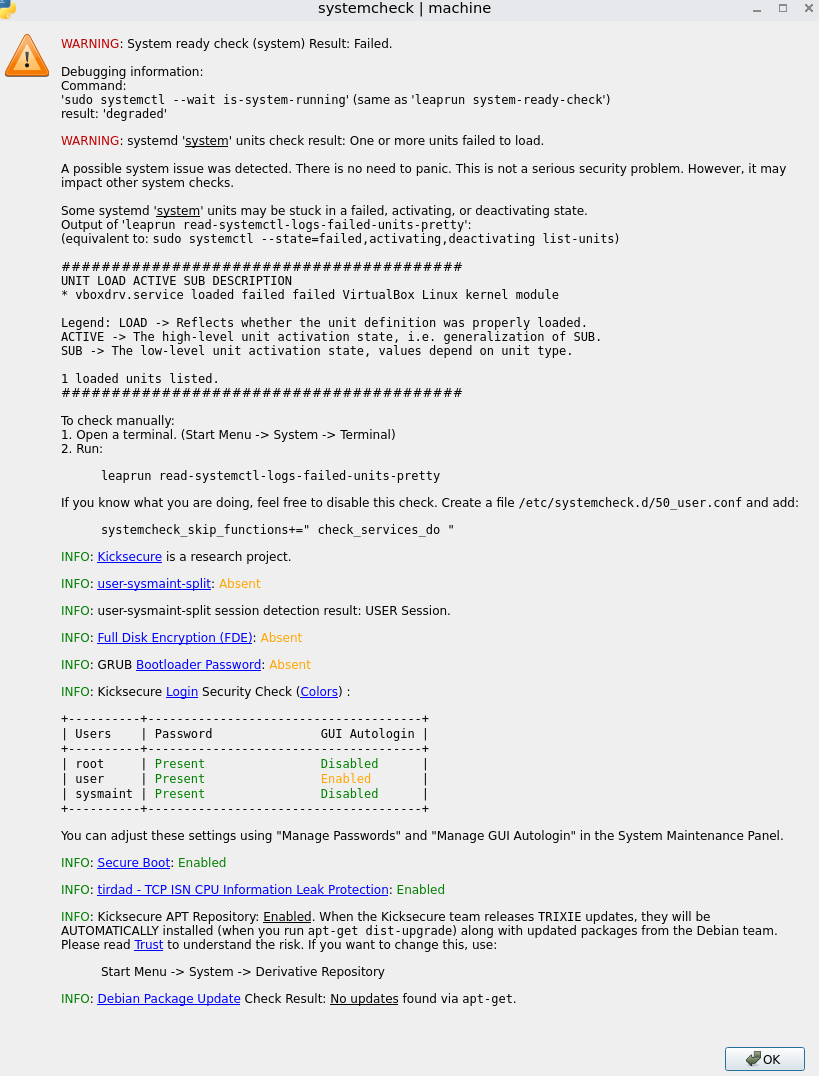
degraded
Legend: LOAD → Reflects whether the unit definition was properly loaded.
1 loaded units listed.
1 Like
This one applicable?
opened 01:47AM - 23 Apr 26 UTC
closed 04:22PM - 16 Jun 26 UTC
bug
fixed in svn
### Version
7.1.18
### Host OS Type
Linux
### Host OS name + version
Debian… 13.4
### Host Architecture
x86
### Guest OS Type
all
### Guest Architecture
x86
### Guest OS name + version
N/A
### Component
VMM
### What happened?
(Apologies if I have the component wrong, I wasn't sure whether to pick VMM or Host Support.)
If a Debian system has the `kernel.kptr_restrict=2` sysctl set, VBoxDrv will trigger a kernel BUG on load. `vboxdrv.service` will show as failed in the output of `systemctl`. The module will technically be loaded into the kernel, but it is completely non-functional in this state, attempting to boot a VM always fails. If the user is unlucky enough to also have panic-on-oops enabled on their machine, this will result in the entire machine crashing.
The relevant output from `dmesg` is:
```
[ 4.956947] vboxdrv: loading out-of-tree module taints kernel.
[ 4.956953] vboxdrv: module verification failed: signature and/or required key missing - tainting kernel
[ 4.968023] vboxdrv: Found 8 processor cores/threads
[ 4.974793] RTR0DbgKrnlInfoOpen: /proc/kallsym method failed. get_user_pages address off by +0x74a91580
[ 5.006678] Missing ENDBR: kallsyms_lookup_name+0x0/0xd0
[ 5.007463] ------------[ cut here ]------------
[ 5.007464] kernel BUG at arch/x86/kernel/cet.c:132!
[ 5.008234] Oops: invalid opcode: 0000 [#1] PREEMPT SMP NOPTI
[ 5.009003] CPU: 2 UID: 0 PID: 1232 Comm: modprobe Tainted: G OE 6.12.74+deb13+1-amd64 #1 Debian 6.12.74-2
[ 5.009793] Tainted: [O]=OOT_MODULE, [E]=UNSIGNED_MODULE
[ 5.010566] Hardware name: Notebook NV4XMB,ME,MZ/NV4XMB,ME,MZ, BIOS 1.07.13NMIN29 07/12/2021
[ 5.011434] RIP: 0010:exc_control_protection+0x29f/0x2b0
[ 5.012312] Code: d8 b9 09 00 00 00 48 8b 93 80 00 00 00 be 80 00 00 00 48 c7 c7 1a 6b 6e 8c e8 fd a9 3c ff 80 a3 8a 00 00 00 fb e9 38 fe ff ff <0f> 0b 66 2e 0f 1f 84 00 00 00 00 00 0f 1f 44 00 00 90 90 90 90 90
[ 5.013215] RSP: 0018:ffffd523c163b8c8 EFLAGS: 00010002
[ 5.014115] RAX: 000000000000002c RBX: ffffd523c163b8f8 RCX: 0000000000000000
[ 5.015024] RDX: 0000000000000000 RSI: ffff8f2451321780 RDI: ffff8f2451321780
[ 5.015936] RBP: 0000000000000000 R08: 0000000000000000 R09: ffffd523c163b758
[ 5.016841] R10: ffffffff8ceb43c8 R11: 0000000000000003 R12: 0000000000000003
[ 5.017737] R13: 0000000000000000 R14: 0000000000000000 R15: 0000000000000000
[ 5.018648] FS: 00007fbc4d69f5c0(0000) GS:ffff8f2451300000(0000) knlGS:0000000000000000
[ 5.019557] CS: 0010 DS: 0000 ES: 0000 CR0: 0000000080050033
[ 5.020460] CR2: 00007fbc4cef3cb0 CR3: 000000010d6ca005 CR4: 0000000000f72ef0
[ 5.021364] PKRU: 55555554
[ 5.022275] Call Trace:
[ 5.023183] <TASK>
[ 5.024070] asm_exc_control_protection+0x26/0x30
[ 5.024964] RIP: 0010:kallsyms_lookup_name+0x0/0xd0
[ 5.025844] Code: 79 0a 48 f7 d0 48 03 05 3e d9 29 01 c3 cc cc cc cc 66 0f 1f 84 00 00 00 00 00 90 90 90 90 90 90 90 90 90 90 90 90 90 90 90 90 <66> 0f 1f 00 0f 1f 44 00 00 53 48 83 ec 10 65 48 8b 04 25 28 00 00
[ 5.026768] RSP: 0018:ffffd523c163b9a0 EFLAGS: 00010282
[ 5.027690] RAX: ffffffff8b3c7c40 RBX: ffff8f1ccd908010 RCX: 0100000000000000
[ 5.028613] RDX: 00ffffffffdfffff RSI: 0000000000000000 RDI: ffffffffc243b6a7
[ 5.029529] RBP: ffffd523c163b9f8 R08: 0000000000000000 R09: 0000000000000001
[ 5.030445] R10: 0000000000000002 R11: 0000000000000001 R12: ffffd523c163ba08
[ 5.031362] R13: ffffffffc243b6a7 R14: 0000000000000000 R15: ffff8f1ccaca1368
[ 5.032275] ? __pfx_kallsyms_lookup_name+0x10/0x10
[ 5.033188] VBoxHost_RTR0DbgKrnlInfoQuerySymbol+0x19b/0x280 [vboxdrv]
[ 5.034130] VBoxHost_RTR0DbgKrnlInfoGetSymbol+0x31/0x60 [vboxdrv]
[ 5.035063] rtR0InitNative+0x7c/0xd0 [vboxdrv]
[ 5.035984] VBoxHost_RTR0Init+0x3c/0x150 [vboxdrv]
[ 5.036904] VBoxDrvLinuxInit+0x46/0xff0 [vboxdrv]
[ 5.037830] ? __pfx_VBoxDrvLinuxInit+0x10/0x10 [vboxdrv]
[ 5.038750] do_one_initcall+0x5b/0x310
[ 5.039643] do_init_module+0x60/0x230
[ 5.040534] init_module_from_file+0x89/0xe0
[ 5.041412] idempotent_init_module+0x11e/0x310
[ 5.042292] __x64_sys_finit_module+0x5e/0xb0
[ 5.043170] do_syscall_64+0x82/0x190
[ 5.044043] ? touch_atime+0x1e/0x120
[ 5.044904] ? filemap_read+0x340/0x370
[ 5.045780] ? vfs_read+0x15e/0x360
[ 5.046652] ? vfs_read+0x15e/0x360
[ 5.047510] ? __x64_sys_pread64+0x98/0xd0
[ 5.048360] ? arch_exit_to_user_mode_prepare.isra.0+0x16/0xa0
[ 5.049222] ? syscall_exit_to_user_mode+0x37/0x1b0
[ 5.050075] ? clear_bhb_loop+0x40/0x90
[ 5.050924] ? clear_bhb_loop+0x40/0x90
[ 5.051759] ? clear_bhb_loop+0x40/0x90
[ 5.052581] entry_SYSCALL_64_after_hwframe+0x76/0x7e
[ 5.053402] RIP: 0033:0x7fbc4cf1a7b9
[ 5.054243] Code: ff c3 66 2e 0f 1f 84 00 00 00 00 00 0f 1f 44 00 00 48 89 f8 48 89 f7 48 89 d6 48 89 ca 4d 89 c2 4d 89 c8 4c 8b 4c 24 08 0f 05 <48> 3d 01 f0 ff ff 73 01 c3 48 8b 0d 27 66 0d 00 f7 d8 64 89 01 48
[ 5.055107] RSP: 002b:00007fff9b269b78 EFLAGS: 00000246 ORIG_RAX: 0000000000000139
[ 5.055986] RAX: ffffffffffffffda RBX: 00005641100d69d0 RCX: 00007fbc4cf1a7b9
[ 5.056854] RDX: 0000000000000000 RSI: 00005640f0a4632b RDI: 0000000000000003
[ 5.057727] RBP: 0000000000000000 R08: 0000000000000000 R09: 00005641100d9c00
[ 5.058603] R10: 0000000000000000 R11: 0000000000000246 R12: 00005640f0a4632b
[ 5.059464] R13: 0000000000040000 R14: 00005641100d6af0 R15: 0000000000000000
[ 5.060305] </TASK>
[ 5.061145] Modules linked in: vboxdrv(OE+) qrtr bnep binfmt_misc intel_rapl_msr intel_rapl_common nls_ascii intel_uncore_frequency nls_cp437 intel_uncore_frequency_common vfat x86_pkg_temp_thermal fat snd_sof_pci_intel_tgl snd_sof_pci_intel_cnl snd_sof_intel_hda_generic soundwire_intel soundwire_generic_allocation soundwire_cadence snd_sof_intel_hda_common snd_soc_hdac_hda snd_sof_intel_hda_mlink snd_sof_intel_hda snd_sof_pci snd_sof_xtensa_dsp snd_sof snd_hda_codec_hdmi snd_sof_utils snd_soc_acpi_intel_match intel_powerclamp snd_soc_acpi coretemp soundwire_bus iwlmvm kvm_intel snd_soc_avs snd_soc_hda_codec snd_hda_ext_core snd_hda_codec_realtek kvm mac80211 snd_hda_codec_generic snd_soc_core snd_hda_scodec_component irqbypass snd_compress crct10dif_pclmul snd_pcm_dmaengine libarc4 ghash_clmulni_intel snd_hda_intel sha512_ssse3 uvcvideo sha256_ssse3 btusb snd_intel_dspcfg iwlwifi sha1_ssse3 snd_intel_sdw_acpi btrtl snd_hda_codec videobuf2_vmalloc aesni_intel btintel uvc videobuf2_memops videobuf2_v4l2 btbcm gf128mul
[ 5.061182] btmtk crypto_simd snd_hda_core videodev cryptd mei_hdcp mei_pxp bluetooth snd_hwdep videobuf2_common cfg80211 rapl snd_pcm intel_cstate mc wmi_bmof ecdh_generic snd_timer mei_me intel_uncore snd pcspkr mei ee1004 soundcore rfkill intel_pmc_core igen6_edac joydev intel_hid intel_vsec ac sparse_keymap pmt_telemetry acpi_pad pmt_class evdev msr parport_pc ppdev lp parport configfs efi_pstore nfnetlink efivarfs ip_tables x_tables autofs4 ext4 crc16 mbcache jbd2 crc32c_generic xe drm_gpuvm drm_exec gpu_sched drm_suballoc_helper drm_ttm_helper i915 drm_buddy i2c_algo_bit drm_display_helper cec hid_multitouch rc_core hid_generic ttm i2c_hid_acpi drm_kms_helper i2c_hid iTCO_wdt hid rtsx_pci_sdmmc intel_pmc_bxt r8169 xhci_pci iTCO_vendor_support mmc_core realtek xhci_hcd watchdog nvme psmouse mdio_devres ucsi_acpi drm thunderbolt libphy typec_ucsi crc32_pclmul serio_raw nvme_core usbcore crc32c_intel typec intel_lpss_pci i2c_i801 rtsx_pci intel_lpss i2c_smbus roles button video idma64 battery nvme_auth usb_common
[ 5.065862] wmi
[ 5.071988] ---[ end trace 0000000000000000 ]---
[ 5.104282] iwlwifi 0000:00:14.3: Registered PHC clock: iwlwifi-PTP, with index: 0
[ 5.307927] RIP: 0010:exc_control_protection+0x29f/0x2b0
[ 5.309913] Code: d8 b9 09 00 00 00 48 8b 93 80 00 00 00 be 80 00 00 00 48 c7 c7 1a 6b 6e 8c e8 fd a9 3c ff 80 a3 8a 00 00 00 fb e9 38 fe ff ff <0f> 0b 66 2e 0f 1f 84 00 00 00 00 00 0f 1f 44 00 00 90 90 90 90 90
[ 5.311914] RSP: 0018:ffffd523c163b8c8 EFLAGS: 00010002
[ 5.313900] RAX: 000000000000002c RBX: ffffd523c163b8f8 RCX: 0000000000000000
[ 5.315871] RDX: 0000000000000000 RSI: ffff8f2451321780 RDI: ffff8f2451321780
[ 5.317860] RBP: 0000000000000000 R08: 0000000000000000 R09: ffffd523c163b758
[ 5.319866] R10: ffffffff8ceb43c8 R11: 0000000000000003 R12: 0000000000000003
[ 5.321883] R13: 0000000000000000 R14: 0000000000000000 R15: 0000000000000000
[ 5.323901] FS: 00007fbc4d69f5c0(0000) GS:ffff8f2451300000(0000) knlGS:0000000000000000
[ 5.325902] CS: 0010 DS: 0000 ES: 0000 CR0: 0000000080050033
[ 5.327892] CR2: 00007fbc4cef3cb0 CR3: 000000010d6ca005 CR4: 0000000000f72ef0
[ 5.329912] PKRU: 55555554
[ 5.331911] note: modprobe[1232] exited with irqs disabled
```
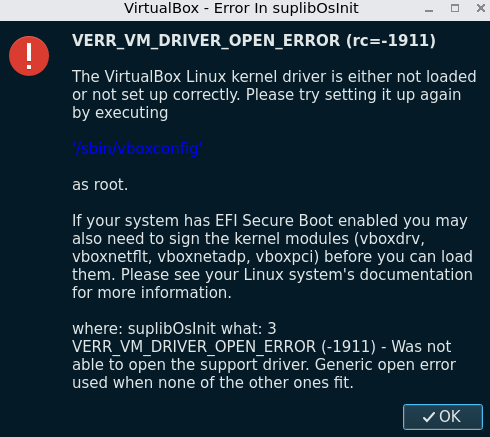
The following window appears when trying to launch a VM in this state:
```
VirtualBox - Error In suplibOsInit
VERR_VM_DRIVER_OPEN_ERROR (rc=-1911)
The VirtualBox Linux kernel driver is either not loaded or not
set up correctly. Please try setting it up again by executing
'/sbin/vboxconfig'
as root.
If your system has EFI Secure Boot enabled you may also need
to sign the kernel modules (vboxdrv, vboxnetflt, vboxnetadp,
vboxpci) before you can load them. Please see your Linux
system's documentation for more information.
where: suplibOsInit what: 3
VERR_VM_DRIVER_OPEN_ERROR (-1911) - Was not able to
open the support driver. Generic open error used when none
of the other ones fit.
```
### How can we reproduce this?
1. Install a fresh copy of Debian 13.4 with the GNOME desktop on a physical device. (I'm using a laptop with an i5-1135G7 processor.)
2. Install VirtualBox 7.1 following the "Debian-based Linux distributions" instructions from https://www.virtualbox.org/wiki/Linux_Downloads.
3. Run `sudo modprobe -r kvm_intel; sudo modprobe -r kvm` to make sure KVM doesn't get in the way of VirtualBox.
4. Launch VirtualBox, and create a FreeDOS virtual machine.
5. Verify that you can boot the VM successfully.
6. Create a file at `/usr/lib/sysctl.d/990-crash-vbox.conf`, with the contents `kernel.kptr_restrict=2`.
7. Reboot the device.
8. Run `systemctl status vboxdrv.service`. Observe that it shows as `Active: failed`.
9. Run `sudo dmesg`. You will see a kernel backtrace.
10. Run `sudo modprobe -r kvm_intel; sudo modprobe -r kvm` to get KVM to go away again.
11. Launch VirtualBox, and attempt to launch the FreeDOS virtual machine. The window described above will appear and the VM will not launch.
### Did you upload *all* of your necessary log files, screenshots, etc.?
- [x] Yes, I've uploaded all pertinent files to this issue.
EDIT: Fixed according to above ticket.
1 Like
Never mind systemcheck. It’s just the messenger and the messenger is right.
vboxdrv / VirtualBox is the issue.
1 Like
While waiting for Oracle to publish a new version of VirtualBox with the issue fixed, some workarounds are documented here:
Note that the issue described here is a VirtualBox bug, it is not a Kicksecure bug.
If you use virtualbox-installer-cli to install VirtualBox, you will get a recent version of VirtualBox from Oracle’s repository. VirtualBox 7.1.18 and VirtualBox 7.2.6 (the two latest versions at the time of this writing) both have a bug that results in a kernel oops when the vboxdrv kernel module is loaded if a particular hardening setting (kernel.kptr_restrict=2) is enabled. This setting is enabled by default …
1 Like
@ValdemarJo Try upgrading again and see if VirtualBox 7.2.10 fixes that for you.
So VirtualBox 7.2.10 was out containing the fix. I’ve been using it just fine I think.
If you did this before,
You may want to undo that with sudo apt-markunholdvirtualbox-7.1 virtualbox-7.2 before doing the usual package upgrades.
2 Likes
It seems to have been fixed
2 Likes
opened 07:07PM - 31 Aug 25 UTC
closed 10:51AM - 11 Sep 25 UTC
enhancement
fixed in svn
### Component
Host Installer
### What problem are you facing?
Due to a perfor… mance optimization in Linux 6.12 and higher, KVM now takes exclusive control of the system's virtualization features when the KVM kernel modules are loaded, and does not release them even if all KVM virtual machines are powered down. This means that VirtualBox is effectively broken on all Linux distributions that use a 6.12 or higher kernel. Un-breaking it requires setting `kvm.enable_virt_at_load=0` in the kernel via either the command line or a modprobe config, which makes it much more difficult for a user to get VirtualBox working.
### How can we fix this?
Any user who installs VirtualBox on their system will fall into one of two categories:
* Either A, they don't care about having KVM virtual machines sometimes load slightly slower, and just want to be able to use VirtualBox provided they have no KVM VMs running. Almost all users probably fall into this group.
* Or B, they do care about having KVM virtual machines start as quickly as possible in all scenarios, and prefer to simply manually unload the `kvm_XXX` and `kvm` kernel drivers before using VirtualBox. I'm not sure any users fall into this group, but it's theoretically possible.
To satisfy both groups of users, VirtualBox's Linux packages can ship a file under `/etc/modprobe.d` that will set `options kvm enable_virt_at_load=0`, allowing VirtualBox and KVM to coexist the same way they coexisted previously. This will make VirtualBox just work for the first group of users.
To satisfy the second group of users, this configuration file should be marked as a "conffile". Under Debian-based distros, simply installing the file anywhere under `/etc` is enough for it to be marked as a conffile, while under RPM-based distros the config file should be marked as `%config(noreplace)` (I believe, though I haven't tested this). This will allow users to modify delete the configuration file, without RPM reverting it the next time VirtualBox is updated. Thus, for the users who want to have VirtualBox broken by default and want to manually fix it as necessary, they can delete the configuration file and be done.
### What alternatives or workarounds exist?
* Unload the `kvm_XXX` and `kvm` kernel modules before using VirtualBox,
* or set `options kvm enable_virt_at_load=0` in `/etc/modprobe.d`,
* or set `kvm.enable_virt_at_load=0` on the kernel command line.
All of these work, but they are a pain to configure, and some users with less technical skill may accidentally break their system while attempting to do one of these things manually.
### Anything else we should know?
Debian's VirtualBox package already ships a file at `/usr/lib/modprobe.d/virtualbox-dkms.conf` which sets `options kvm enable_virt_at_load=0`. This doesn't really provide much room for the second hypothetical group of users (who want a broken VBox by default), but it works.
Now the opposite is happening.
When using VirtualBox version 7.2.10 with kvm.enable_virt_at_load=0 set, host freezes when attempting to start a VM.
Upstream issue:
opened 07:19PM - 16 Jun 26 UTC
bug
### Version
7.2.10
### Host OS Type
Linux
### Host OS name + version
Arch L… inux (latest)
### Host Architecture
x86
### Guest OS Type
Linux
### Guest Architecture
x86
### Guest OS name + version
Arch Linux (latest)
### Component
Unspecified
### What happened?
With the latest distribution packages the system freezes when starting a VM. The only way to recover is a cold reset (hold the power button or pull the power cord).
The journal ends before the freeze, and log files in home directory are created, but empty. Sadly can not provide any info...
### How can we reproduce this?
Update to lasted version (on Arch Linux?) and start a VM...
### Did you upload *all* of your necessary log files, screenshots, etc.?
- [x] Yes, I've uploaded all pertinent files to this issue.
Thanks to @arraybolt3 for pointing me at this!
1 Like